Univariate and Bivariate Data
Univariate: one variable,
Bivariate: two variables
Univariate means "one variable" (one type of data)
Example: Travel Time (minutes): 15, 29, 8, 42, 35, 21, 18, 42, 26
The variable is Travel Time
Example: Puppy Weights

You weigh the pups and get these results:
2.5, 3.5, 3.3, 3.1, 2.6, 3.6, 2.4
The variable is Puppy Weight
We can do lots of things with univariate data:
- Find a central value using mean, median and mode
- Find how spread out it is using range, quartiles and standard deviation
- Make plots like Bar Graphs, Pie Charts and Histograms
Bivariate means "two variables", in other words there are two types of data
With bivariate data we have two sets of related data we want to compare:
Example: Sales vs Temperature
An ice cream shop keeps track of how much ice cream they sell versus the temperature on that day.
The two variables are Ice Cream Sales and Temperature.
Here are their figures for the last 12 days:
| Ice Cream Sales vs Temperature | |
| Temperature °C | Ice Cream Sales |
|---|---|
| 14.2° | $215 |
| 16.4° | $325 |
| 11.9° | $185 |
| 15.2° | $332 |
| 18.5° | $406 |
| 22.1° | $522 |
| 19.4° | $412 |
| 25.1° | $614 |
| 23.4° | $544 |
| 18.1° | $421 |
| 22.6° | $445 |
| 17.2° | $408 |
And here is the same data as a Scatter Plot:
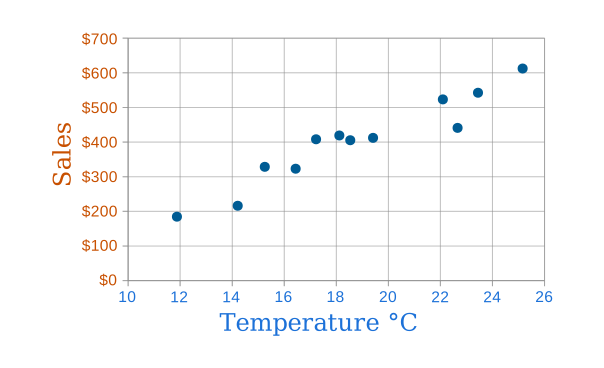
Now we can easily see that warmer weather and more ice cream sales are linked, but the relationship is not perfect.
So with bivariate data we are interested in comparing the two sets of data and finding any relationships.
We can use Tables, Scatter Plots, Correlation, Line of Best Fit, and plain old common sense.